[Jaffa Software]

Monday, 31 March 2008

Non-tablet software in maemo.org downloads

X-Fade's been working hard and bug #2347 has been fixed. This now means that the official maemo.org downloads catalogue can now contain non-tablet software such as tablet-encode.

Hopefully this'll boost the profile of things like mediautils to a wider audience.

Steps are simple:

  1. Go to add new application (logging in if necessary) and fill out the fields as detailed.
  2. One particularly cool feature is the ability to put in a direct download URL for the "click to install" arrow.
  3. Don't try and attach any screenshots until you've first saved the details; there's an issue with that and it's best done when editing the page after the first save.

I've raised a feature request that the download statistics available to extras(-devel) users are picked up from garage.maemo.org for a more integrated system.

Saturday, 29 March 2008

tablet-encode v2.18 - with much improved DVD ripping

tablet-encode has had v2.18 released. Notable new features in this release include:

  • A new "mplayer" preset with a very high bitrate.
  • Ability to define your own presets and options in ~/.tablet-encode.conf.
  • Ability to rip all the episodes off a DVD with a single option.
  • Add support for Freevo FXD files as pointers to the actual video.

The --episodes option is particularly cool; ripping a TV series' DVD (for, say, a long flight) is now a 3-step process:

  1. Attach N810 via USB.
  2. Insert DVD to computer.
  3. Run:
    tablet-encode --episodes dvd: /media/nokia-sd/Video/

It's hard to imagine it being any easier! Of course, at some point the GUI should support showing you thumbnails of each of the titles so you can select the ones you want to rip. If anyone's got any time, and experience with Perl Gtk+, I'd be happy to accept some help in improving the GUI version.

I'd also like to thank GeneralAntilles, rm_you, Marius Gedminas, Mike Lococo and divinerites for all their help with this release.

Sunday, 9 March 2008

Improving application start-up: mockup

A quick follow-up to my post on improving application start-up usability. I've done a very rough & ready mockup:

A higher-quality (but not any better put together) AVI can be downloaded (333KB).

Saturday, 8 March 2008

Improving application start-up usability

The announce of the iPhone SDK has revealed some interesting facts; including a particularly ingenious (and simple) way Apple have improved the user experience of starting applications.

It's a bit of a cheat, but with sound User experience Design (UxD) principles behind it: two small waits are better than one long one. It's why we have "please wait" messages on everything from ATMs to websites, and Hildon Desktop's own "Application loading" info messages at the top-right. The user feels the action is progressing whilst complex operations are occurring underneath.

Therefore, Apple's idea is simple: display an image of the application completely empty of content, but with the structure of its window in place as quickly as possible after launch. When the app actually opens its window, it replaces the image.

For example, the "launch image" for the iPhone's Settings app is shown on the left, with the actual app's first window on the right:

...and the Stocks app:

I've just posted to maemo-developers an idea for similar within the Hildon Desktop. For example, imagine the instant you selected File Manager from the launch menu, this image was shown:

The normal "File Manager loading" infoprint would also be shown, and then the File Manager proper would open and replace it.

Although it's "only" a few seconds we're talking about, I think it could really make ITOS feel more responsive. Given we've only got a 400MHz processor to play with, the impression of speed is just as important as the making the startup time as low as possible (but with the overhead of shared libraries etc. there's a lower bound which is achievable).

Comments, as ever, welcome.

Tuesday, 19 February 2008

Wi-fi triangulation

The iPod Touch has recently gained a location ability, despite not having a GPS. How?

A company, called Skyhook Wireless have driven around the US and Europe with a laptop and a GPS; recording the position and strength of every wireless access points SSID they detect.

A device, such as the iPod Touch, can have a database - or use the Internet - to go the other way: "I can see these APs with these signal strengths. Where am I?". A colleague tried this in the centre of London and it was accurate to within 20m!

The advantage of this on Maemo are obvious: for the N800, it provides a mechanism for knowing where you are (in built-up areas) without an external GPS. On the N810 it can be used to prime the built-in GPS for faster lock times, and get a lock within buildings etc.

Skyhook make money licencing their technology to OEMs etc., however their SDK is downloadable and, once you get through the signup process, you find they've got ARMEL binaries for Maemo 3.1 (i.e. OS2007).

Unfortunately, I don't have an OS2007 device, and trying to get it working on OS2008 ultimately resulting in a segmentation fault. They've yet to reply to the email I sent asking if they've got a Maemo 4.0 (chinook/OS2008) SDK available.

However, this is promising for two reasons: 1) they're aware of Maemo; 2) it might be something Nokia is looking at licencing.

All of this could be tied together with GeoClue and at some point we might take advantage of location-based services. That'd be a cool day.

Sunday, 13 January 2008

Solving the lack of QA and muliple repositories problem

I've just sent an email to maemo-developers asking for feedback on an idea:

RFC: Proposal to solve multiple repository, poor QA situation

There is an increasingly acute problem with the Internet Tablets, the number of repositories a user has to install to correctly get some software is growing. It has been regularly discussed on maemo-dev that the best thing to have would be for all packages to be in extras - especially since in OS2008 it is now included by default (albeit disabled).

I fear that the gronmayer.com database of repositories - no matter how useful it is - will only exacerbate the situation.

What I'm suggesting is an easy way for developers to upload to extras, with a group of volunteers doing the legwork of signing and uploading the packages, doing quality assurance and so on.

This should make it easier for developers (no need to have their own repos any more), and easier for users since they'll only need to enable the extras repository and know that none of the software in there will brick their device, be uninstallable etc.

The QA will also allow users to use the categories of the Application Manager more, as the gatekeepers will strictly limit the categories that are used by the packages flowing through them.

Of course, this system will be voluntary: I'm in no position to dictate that everyone use it, but hopefully there'll be sufficient benefits to everyone to make it a viable scheme.

Saturday, 15 December 2007

N810 thoughts

Although the discount codes aren't working yet, I've managed to play with an N810 (which may well end up becoming my wife's). Here are some random thoughts:

  • It's thin. Much thinner than I was expecting. Although you definitely notice the heavier weight compared with an N800. It's not too heavy, though.
  • The brushed metal and styling generally is very nice. I love the look of this thing, and not having the d-pad on the front makes it that much neater.
  • I keep hitting "Escape" when trying to hit the "Home" key on the side when switching between browser windows. Escape in the browser causes it to go back. Doh!
  • The keyboard is nice, not as nice as an Eee's (of course), but much better than the thumb keyboard. Fortunately, I don't have fingers that are that fat, so the well-commented lack of space above the top row isn't too irksome.
  • The GPS didn't take too long to acquire it's initial lock (I left it out in the garden for 5 minutes this morning). Acquiring a new lock takes a few seconds when it's just tucked (upright) in one of the compartments below the dashboard on my car. Very happy with that, what with all the worries about lock time acquisition.
  • The car mount comes with no instructions whatsoever. I've worked out that you can pop the back off the N810-specific bit to bolt that on to the stand; but the stand itself has to be screwed into a dashboard. That ain't happening on my car. No sir. It looks like it should be possible to get a sucker-style or clip-style stand; but whether these are separately sold - and where - is unknown.
  • I often get my nail between the keyboard and the screen, rather than the keyboard and the flip stand. Again, a little irritating.
  • Media playback is better than ever. Although there's a nasty bug whereby it forgets it knows how to play a file: #2565.
  • Talking of bugs, there're a few irritating ones:

    • #2564: No consistency on scrolling/scrollbars in bundled OS2008 applications
    • #2567: Maps should restart showing your previous location, not the country at a zoomed out level
    • #2568: Menu icons for newly installed software are not shown at correct size

Overall, very impressed. Get one if you haven't got an N800 already.

Tuesday, 11 December 2007

tablet-encode v2.15 - now with GUI

tablet-encode v2.15 is now available to download, making it even easier to convert your videos to a format suitable for the Nokia Internet Tablets.

The primary enhancement in this release is the addition of a simple GUI mode, in addition to the full-power of the command line from previous versions:

width="174" height="124" alt="[Selecting an input video]"
title="Selecting an input video" />

The GUI is entirely optional: if you have the gtk2-perl bindings installed it will be opened if you don't specify any command line options. You can also get a progress bar up, if you pass --gui in along with your command line options. This is particularly suitable when putting tablet-encode in to your "Send To" menu.

There are a number of other small enhancements, thanks to all those who gave input or contributed patches. Full details are in the change log.

Friday, 23 November 2007

N810 not available until December?

[Delays likely]According to gbuergisser, Nokia Europe have told him: "the N810 will not be available for a few weeks (December for sure) in Europe."

This fits with the NokiaUSA.com date of 2007-12-19. As zerojay's said, we're getting stuff cheap so shouldn't complain (too much), but it is frustrating. Users are getting N810s from retailers in the US, but no-one on the device programme have been able to get one yet. This is frustrating to end-users as they've got no software, and it's frustrating to the lucky 500 watching people get them before them and then moaning there's no software.

Fortunately Quim Gil's recognised this, but we're still pretty much in the dark on actual dates and why it's been delayed in some markets from the original mid-November date.

Tuesday, 20 November 2007

Nokia launch Internet Tablet Video Converter

Nokia have launched the Internet Tablet Video Converter which is, by far and away (IMHO), the single best video converter for Windows for owners of the Nokia Internet Tablets.


Interface

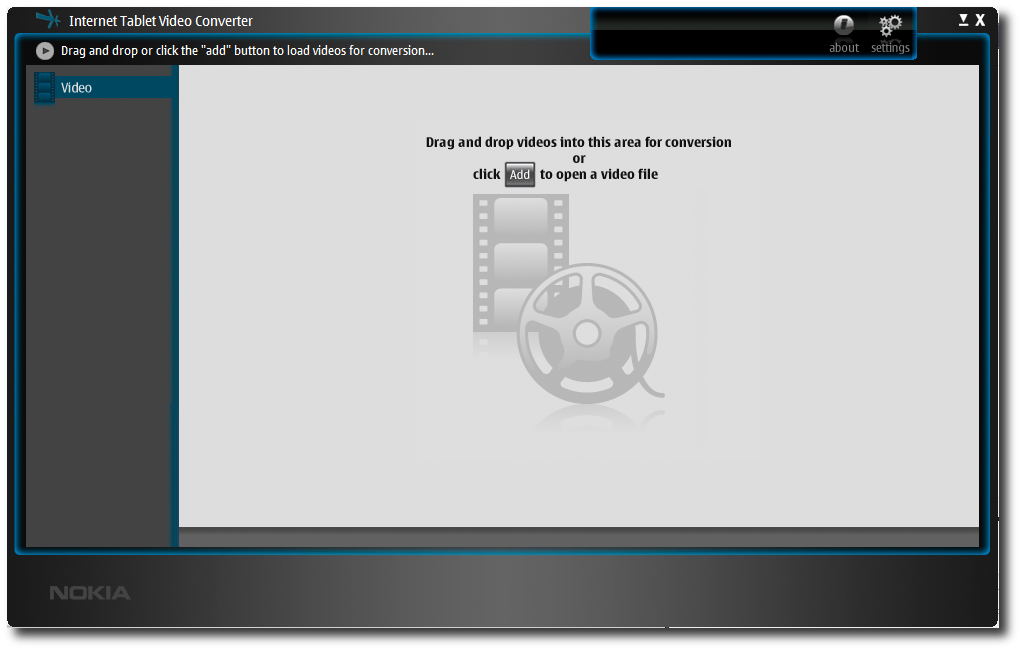
The interface is powered by Mozilla, and is a smart, black GUI looking vaguely reminiscent of the Hildon desktop:

Main ITVC interface

From here, videos can be dragged and dropped on to the window; or added explicitly by clicking on the "Add" button. There are also buttons in the top-right (corresponding to the status bar on a Maemo device) for an about box and to bring up the settings.

Interestingly, the far-left hand side contains the button "Video", suggesting that future versions may handle DVDs or other media sources. There's no sign of that in the app, yet, though.


Converting a video

Videos are converted into MP4 files (rather than all the other media converters which target DivX/Xvid). This is only of technical interest, as the user experience remains the same.

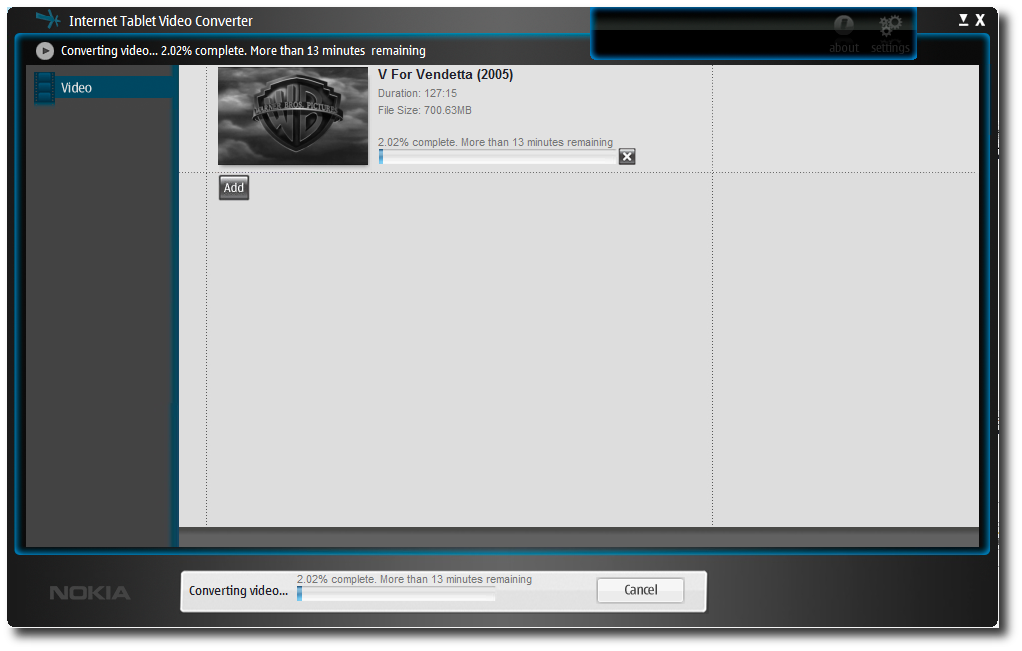
Multiple videos can be converted simultaneously, with the total progress and time remaining, and each video's progress and ETA shown in the interface:

ITVC converting a video

Once converted videos can be copied one at a time, or many together to a connected tablet through the interface; as well as deleted etc. Converted videos are kept over a number of instances, but a maximum number of videos can be specified which, once reached, will result in the oldest converted videos being deleted.


Settings

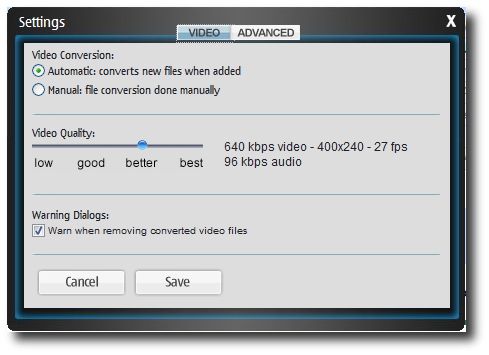
The settings button brings up a simple UI, from where the quality of the converted videos can be set on a slider; and more advanced settings like where the converted videos should be stored:

ITVC settings window

As with my own tablet-encode it uses a preset-based system with options ranging from "low" to "best".


In summary...

For Windows users (who don't want a scriptable program such as tablet-encode), this is definitely the best media converter available.

Monday, 19 November 2007

mediaserv + tablet-encode = mediautils


My command-line video conversion script, 770-encode is very widely used; however its name is obviously something of an anachronism. So with the imminent availability of the N810, it was time to rename it. Welcome, tablet-encode. This new name also comes with a major new version, including a number of long-standing patches from people being applied, such as multiple-file support.

I've also put it, along with mediaserv in a new garage.maemo.org project: mediautils.

Finally, mediaserv has gotten a v0.05 release which fixes a number of small bugs (thanks to all those who reported them) and makes it aware of both tablet-encode and 770-encode as potential encoders it can use.

More information, and links to the Garage downloads can be found at: http://mediautils.garage.maemo.org/

Sunday, 28 October 2007

mediaserv: v0.04 and demo

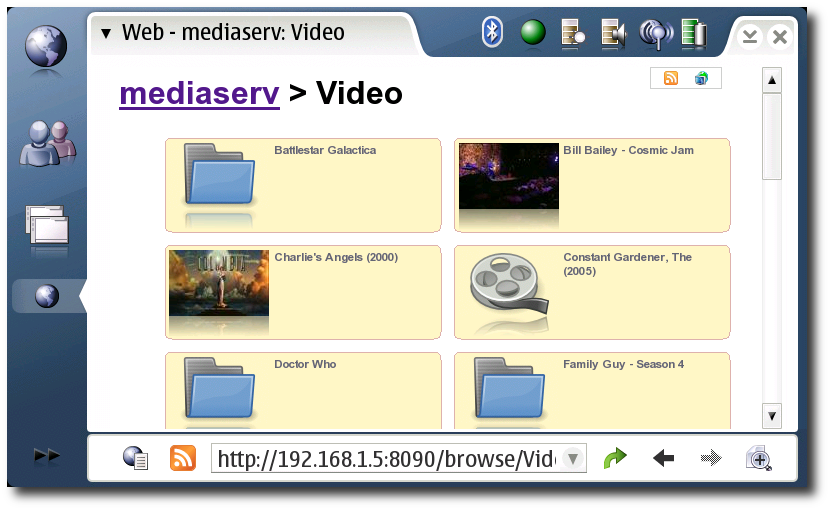
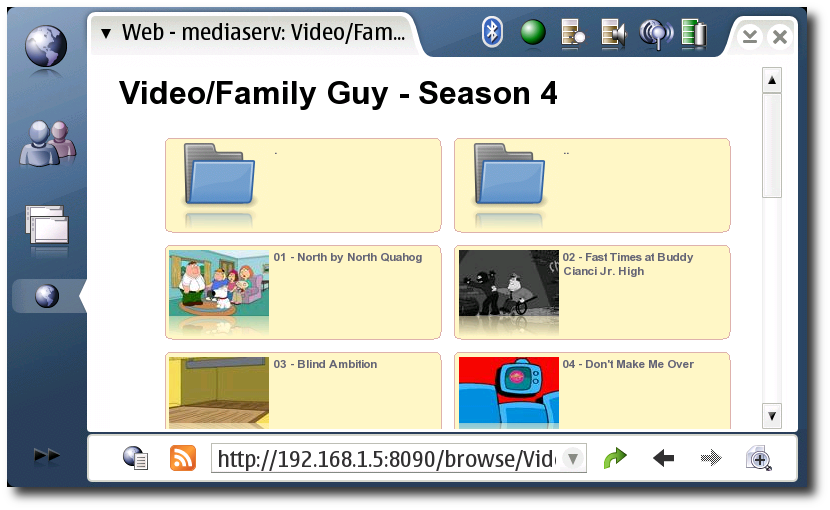
mediaserv has now reached v0.04. Thanks to everyone for providing feedback. Here's a demo of my N800 playing back a DVD rip in 720x576 1000kbps video, 192kbps audio DivX off a 1GHz Via C3 processor box transcoding to 770-encode's "average" preset:

Download: mediaserv-0.04.tar.gz (29KB)

Its main features now include:

  • On-demand transcoding of videos.
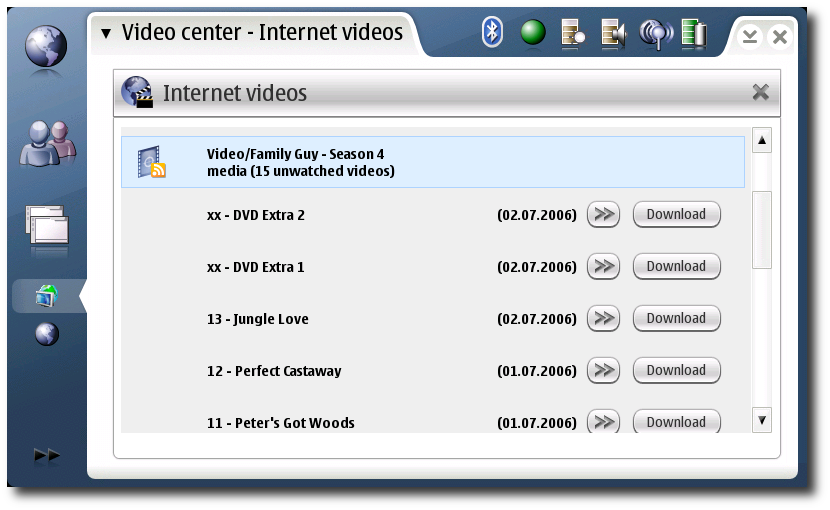
  • Easy-to-use web UI, and integration with Video Center.
  • Playback in standard Media Player or mplayer, depending on the configuration of your Web Browser and/or Video Center.
  • Automatic thumbnail generation.
  • Meta-data from MythTV and Freevo for subtitles and descriptions.
  • Tested on Linux, Mac OS X and other Unix-like OSes.

It's fully documented, but obviously since it's only v0.04 there are almost certainly still bugs and enhancements which can be made. So comments are, as ever, welcome.

Wednesday, 24 October 2007

mediaserv updated: now actually useful

Thanks to everyone who gave me lots of good, positive, constructive feedback on the first version of mediaserv. I've just uploaded mediaserv-v0.02.tar.gz (24KB) where:

  • The 770-encode preset can be specified.
  • The location of 770-encode can be specified.
  • Video Center config files are created, should make adding directories to Video Center that much easier.
  • Usage counting works: so transcoding stops when nothing is reading from the result.
  • A bug whereby the reading could fall off the end of the result has been fixed: if you had videos stopping too soon, this is almost certainly it.
  • Quick links to the RSS feed and Video Center configs added at the top of the page.
  • Hidden files and directories are not shown, instead a breadcrumb trail is created in the banner.

Monday, 22 October 2007

On-demand transcoding server - initial release

I'm very pleased to be able to announce the initial version of "mediaserv", an on-demand transcoding server for videos, targetting the Nokia Internet Tablets.

What's that mean? Well, you don't have to worry about transcoding your video collection in advance: you can just select the video from a web page and get it streamed to your 770, N800 or N810. It's a bit like Orb, apparently, but doesn't require you to sign-up to a third-party website and works on non-Windows platforms.

Even better, it provides RSS feeds which can be used by Nokia's beta Video Center allowing you easy access to files as they are added to your collection.

No fancy web page for it yet, but the tarball for Linux/Unix and Mac OS X (probably) machines is here: mediaserv-0.01.tar.gz (20KB).

Wednesday, 5 September 2007

Palm Foleo cancelled

A couple of emails in my inbox this morning from Ed Colligan, Palm CEO, saying the Foleo's been cancelled:

http://blog.palm.com/palm/2007/09/a-message-to-pa.html

I think the reasons are threefold:

  1. A distinct lack of excitement from the existing Palm userbase (apart from some real zealots) - in fact, real hostility from both their base and columnists.
  2. A mismanagement of the launch and bringing in software developers: obviously some people were getting devices and SDKs, but no-one in the open source community was (AFAICT). All the software announced to date has been rewrites/ports of existing Palm software. Hardly a paradigm shift.
  3. The announcement of the Asus Eee PC and the Via Nanobook platforms killed any chance the Foleo had of success. They're cheaper, more flexible and more open.

(2) is an interesting one: it shows that despite all of the mistakes Nokia made with Maemo, they could've got it so much more wrong.

Sunday, 8 July 2007

Reboot loop with latest firmware

Upgraded to the v4.2007 OS yesterday, and had one problem straight off: running plankton meant an entirely broken UI (and invisible keys on the VKB) - had to reinstall Plankton and hildon-theme-cacher, which would've been a bigger issue if I didn't have the Bluetooth keyboard.

Also tried using the built-in backup/restore (for settings only) for the first time. It saved my network connections (good), but not paired Bluetooth devices (bad).

However, worst of all, this morning it's gone into a reboot loop; it gets 3/5 of the way through the boot and then restarts. It sounds similar to that reported before when the RSS reader applet was crashing the desktop at startup. I've not changed any of the feeds, so it'll be interesting to see if anyone else is experiencing this.

Update: it turns out it was my own playing with my configurable font size control panel applet that was causing the problem: ~/.osso/current-gtk-theme may look like a gtkrc file, but it gets parsed to strip out the current theme name to pass to matchbox when starting it. How disgustingly hacky.